Zonal: Heart Rate Training App
Summary
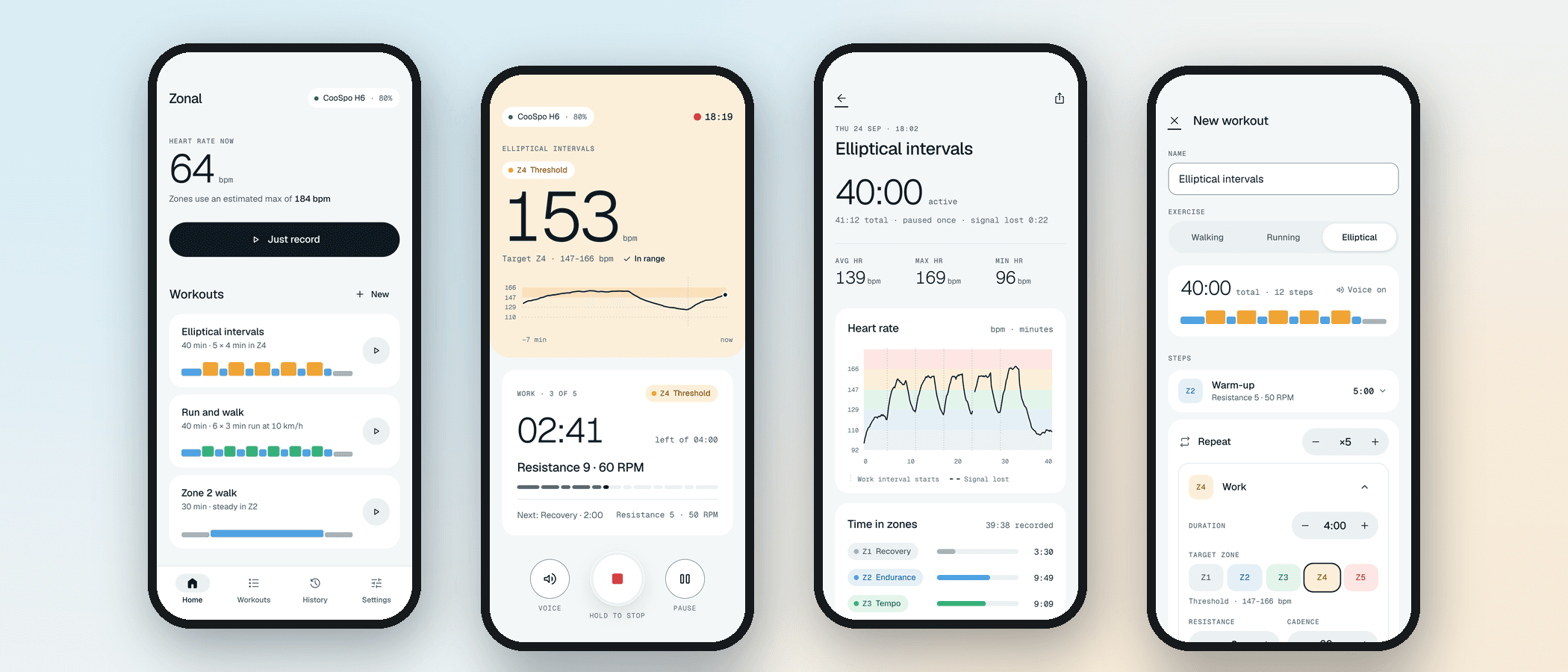
Zonal is an Android app that connects to a Bluetooth heart rate chest strap and shows your live heart rate, coloured by the zone you're in. You can set up interval workouts for walking, running or the elliptical, and a voice tells you when to change pace. Each workout is recorded, and you can export a PDF summary showing your time in each zone. Everything stays on your phone - there are no accounts and nothing goes to the cloud. It was also the first real project I built with aiBoard, my own task board for AI coding agents. I used Opus 5.5 in Cursor to plan the work into small tickets, Grok 4.7 to build them one at a time, and I tested each one before accepting it. It's fully working on a real phone with a real strap.
The Challenge
I couldn't find a simple app that did exactly what I wanted. I needed something that tracked my heart rate in different zones, and that I could set up for interval training with voice prompts. Everything else I tried was too bloated, too complicated or too expensive. I also wanted a proper project to prove aiBoard worked on something real, not just a test.
Product Rationale
Zones first
The live workout screen is built around one thing: the zone you're in right now. Your heart rate sits in a big block of the zone's colour, so you can see where you are at a glance.
Voice coaching
A voice tells you when each interval starts and what to do next, so you don't need to keep looking at your phone. It turns other audio down while it speaks rather than stopping it.
Local only
No accounts, no backend and no cloud. Your workouts and heart rate data stay on your phone.
PDF summaries
After a workout you can export a PDF with the heart rate chart and time in each zone, and share it however you like.
Tech Stack
Key Decisions
My website instead of the Play Store
Releasing a health app that handles heart rate data on Google Play needs a registered UK limited company, which I don't have yet. So for now it's a download from this site instead.
Ready for the Play Store later
I still built the privacy policy, data policy and other Play Store requirements, so it's ready to go when I do set up a company.
One ticket per chat
Cursor's plan mode kept running through its checklist without stopping for me to test. Splitting the build into small aiBoard tickets, one per chat, meant I could test at sensible points and pick up where I left off.
Download
Zonal is finished, fully working and legit. The only reason it isn't on the Google Play Store is that I couldn't release a health and fitness app with heart rate data on there without first having a limited company in the UK. I plan to sort that out in 2027 and release it on the Play Store, with heart rate monitoring and recording free, and the workout setup and voice coaching behind a cheap paywall. Until then, you can install it straight onto an Android phone from here.
Download Zonal (APK)How to install
- On your Android phone, tap the download button above and save the file.
- Open the downloaded file from your notifications or your Downloads folder.
- If your phone says it can't install apps from this source, tap Settings, turn on 'Allow from this source', then go back.
- Tap Install. If Google Play Protect warns that it doesn't recognise the app, tap 'More details' and then 'Install anyway'. This is normal for apps that aren't on the Play Store.
- Open Zonal, allow the permissions it asks for, and put your chest strap on so it can connect.
Visuals
Want to discuss this project?